How to Use a Tremendous Prepaid Visa in the UK (Without Losing the Balance)
Got paid with a Tremendous prepaid Visa and now stuck trying to use it in the UK?
Here’s the quick answer most people are looking for:
What usually works
- Add to Apple Pay / Google Pay and try a single purchase
- Convert the balance into Amazon credit
- Spend it online in one go
What usually doesn’t
- PayPal (often declines)
- ATM withdrawals
- Split payments
- Using small leftover amounts
If you just want the money usable fast:
Convert it to Amazon balance and drain it in one transaction.
Below, I go into exact detail on how to do this… because it’s not as easy as it should be.

These cards are the bane of my life. As somebody who regularly completes online surveys and focus groups, I’m often sent these prepaid cards as a form of payment. And although they look good on paper, they’re a git to get rid of.
Why These Cards Are Awkward in the UK
A Tremendous Visa from the US is:
- Dollar-based (USD)
- Prepaid
- Not linked to a bank
- Often restricted for wallet funding
That combination causes three problems:
- Currency conversion
- Retailer blocks on foreign prepaid cards
- Split payments rarely working
You’re not really “withdrawing” this money.
You’re converting it into something spendable.
PayPal: No Longer Reliable
This used to be the easy workaround.
Now it fails more often than it works.
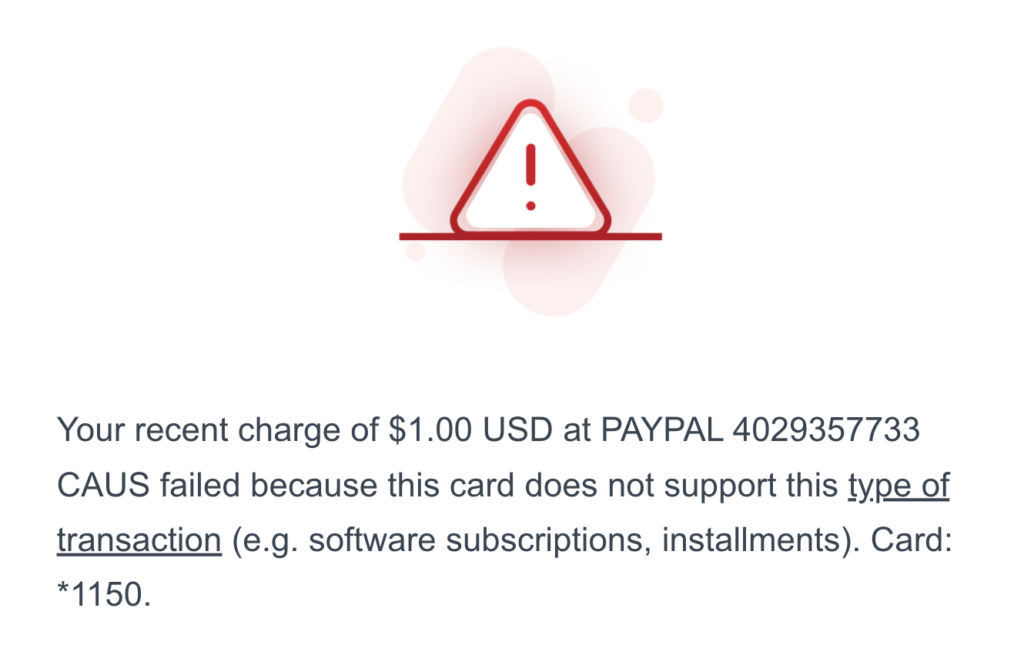
When you add the card, PayPal tries a small $1 verification charge. Many Tremendous cards block this and you’ll see:
“This card does not support this type of transaction.”
That means it won’t allow:
- Wallet funding
- Sending money to yourself
- Verification pre-authorisations
You can try once.
If it declines, don’t keep retrying.
Move on.
Apple Pay / Google Pay: Worth Trying
Tremendous confirms the card can be added to:
- Apple Pay
- Google Pay
- Samsung Pay
But only as a payment method.
You cannot use it to:
- Top up a wallet
- Transfer money out
- Fund balances
Will it work in UK shops?
Sometimes.
Even if it adds successfully:
- Some terminals decline foreign prepaid cards
- Contactless can be inconsistent
- Split payments usually fail
If the purchase total matches the balance closely, it’s worth testing once.
If it declines, don’t fight it.
Most Reliable Method: Top Up Amazon Balance
For UK users, this is usually the least stressful option.
Which is odd, because when you redeem your card, you’ll probably see this.

But there’s a catch when doing this.
Because your prepaid card is in dollars and the exchange rate constantly changes, you won’t get the exact amount in GBP that it says on your card.
So you end up guessing.
How to top up
👉 You can top up your balance from here.
Add your Tremendous card number – you can either do this in your account or at checkout. And no, you can’t cut and paste it. I mean, why make these things easier?
I’ve often found that if I type the number out, I receive this message:

No idea why. If you see it, just copy the number you’ve typed, then delete and paste.
When you pay, make sure to change the currency from USD to GBP.

Now, you won’t get the full amount due to currency changes. The best I’ve had is £24.80 from a £25 card. It can be trial and error, depending on how much you want to squeeze those extra pennies.
As a word of warning, if you get the wrong amount, you can’t cancel the order. Unless you change your payment method, Amazon will keep trying to take payment and you’ll receive notifications for the following week. It gets a little annoying, to say the least.
Very Important: Use It in One Go
This is where most people mess up.
US prepaid cards usually don’t support split payments properly in the UK.
If you spend most of it and leave £2–£3 behind, that remainder can be extremely hard to use.
Many retailers:
- Don’t allow combining cards
- Don’t allow part payments
- Decline small balances
So the goal is:
👉 Use as much of the card as possible in one transaction
What Doesn’t Work Well
Save yourself the hassle:
- ATM withdrawals
- Funding PayPal balance
- Sending money to yourself
- Expecting it to behave like a UK debit card
Treat it as a one-time online spending card.
Exchange Rates: Expect Small Losses
Because the card is in USD:
- Conversion isn’t perfect
- Retailers use their own rates
- The value can move slightly minute to minute
On a £25-ish card, you’ll typically lose under £1.
Annoying, but normal.
Best Strategy Overall
Try this order:
- Apple/Google Pay for a single purchase
- Amazon reload (most reliable)
- Spend on a US website
Avoid leaving small balances behind.
Bottom Line
A US-issued Tremendous prepaid Visa in the UK isn’t useless.
It’s just awkward and frustrating. But don’t let it expire just because it’s a pain. Otherwise, you lose out. Visa gets your money, and you’re just making somebody else richer.
FAQ
Can I transfer it to my bank?
No. You’ll need to spend or convert it.
Why does PayPal decline it?
Most Tremendous prepaid Visas block wallet funding and verification transactions.
Why does the value keep changing?
It’s USD-based and exchange rates move constantly.
Why shouldn’t I leave £2–£3 on it?
Small leftover balances are very hard to spend due to split payment restrictions.
What’s the easiest method?
Amazon balance reload using trial and error to empty the card.