Do Gaming Apps Really Pay? I Tested 5 ‘Play Games for Money’ Apps (UK)
More and more apps claim you can earn real money just by playing mobile games. It sounds like clickbait. Gaming usually drains your wallet, not tops it up.
So I did what I always do with these “easy money” claims: I tested them.
I’ve been gaming since the 1980s, so the idea of getting paid for something I already enjoy is obviously appealing. But let’s set expectations properly: this isn’t a full-time income plan. It’s a way to turn a bit of downtime into £5–£70 here and there, if you’re picky about which offers you do.
If you go in expecting a fortune, you’ll be disappointed. If you go in expecting a few paid evenings on the sofa, you’ll be pleasantly surprised.

The blunt truth
Yes, gaming apps can pay real money in the UK.
But the best results come from:
- choosing the right offers
- quitting fast when a game is clearly a grind
- comparing payouts across apps
Below are the 5 apps I’ve personally used and would actually recommend.
How do “play games for money” apps work?
Most of these apps are GPT platforms (Get Paid To). The basic idea is simple:
- You install a game through the app’s offer wall
- You hit a target (usually a level, HQ level, or chapter milestone) within a time limit
- You get paid (cash, PayPal, gift cards, or points you convert)
The games are usually free to download. The catch is that many are time-heavy and designed to nudge you towards in-app purchases. You can still complete plenty without spending — you just need to choose wisely.
The 5 “play games for money” apps I tested (UK)
1) Swagbucks (Best overall payouts)
If you only try one platform, make it this.
Swagbucks is a proper old-school GPT site. It pays you for surveys, cashback, sign-ups… and a steady stream of mobile game offers.
The gaming offers usually work like this: download the app, reach a level by a deadline, and get paid in stages.
Here’s a real example from my own use:
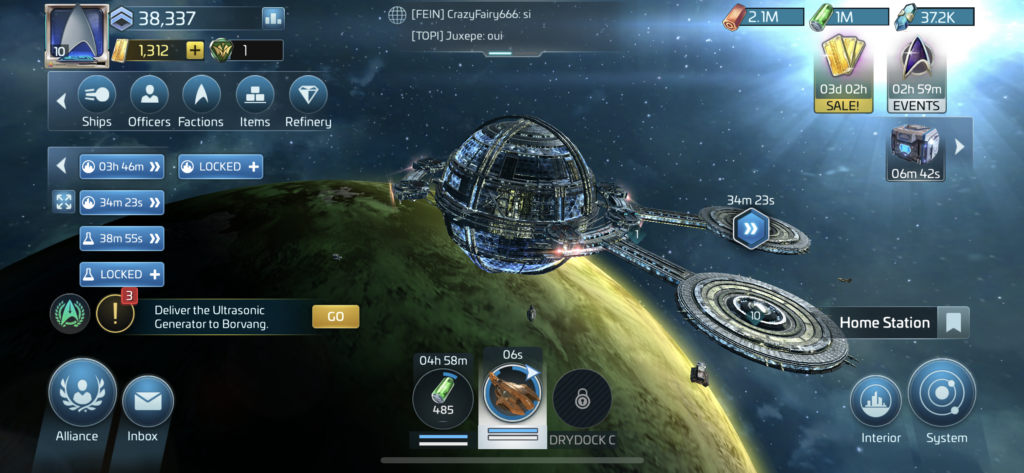
I downloaded Star Trek Fleet Command via Swagbucks and got paid as I progressed:
- Reached level 12 → 500 SB (about £5)
- Reached level 17 → 1,500 SB (about £15)
- Was meant to earn 5,000 SB (about £50) at level 21
- But it actually credited early at level 19
Total earned: £70 in 13 days, with 8 days spare.
Most games on these platforms follow similar patterns (collect resources, build a base, upgrade, repeat). Once you’ve completed one, the next one is usually easier because you understand the formula.
Cashout options include PayPal and gift cards.
👉 Find out more from my full Swagbucks review
2) Qmee (Best for quick, flexible cashouts)
I mainly use Qmee for surveys, but it also has paid game offers — and they often overlap with Swagbucks.
Same concept: install the game, hit the target, get paid.
Where Qmee stands out is that it’s typically very flexible for withdrawals (including small cashouts), which makes it feel more “real money” than points-based platforms.
The key tip with Qmee is to compare payouts before you start any game. The same game can pay noticeably more on one platform than another, so it’s worth a quick check.
👉 Find out more from my full Qmee review
Also worth reading
If you like the idea of leaving your house as little as possible, have a look at these great work-from-home jobs.
3) AttaPoll (Best for casual, low-effort play)
AttaPoll is primarily a survey app, but it sometimes offers game/app tasks as another way to earn.
The payouts aren’t usually as generous as Swagbucks or Qmee, but the targets tend to be lower and more achievable if you’re not interested in a long grind.
If you’re someone who just wants something easy you can dip into without turning it into a project, this is a decent supporting app.
👉 Find out more from my full AttaPoll review
4) Freecash (Best for grinders and streak chasers)
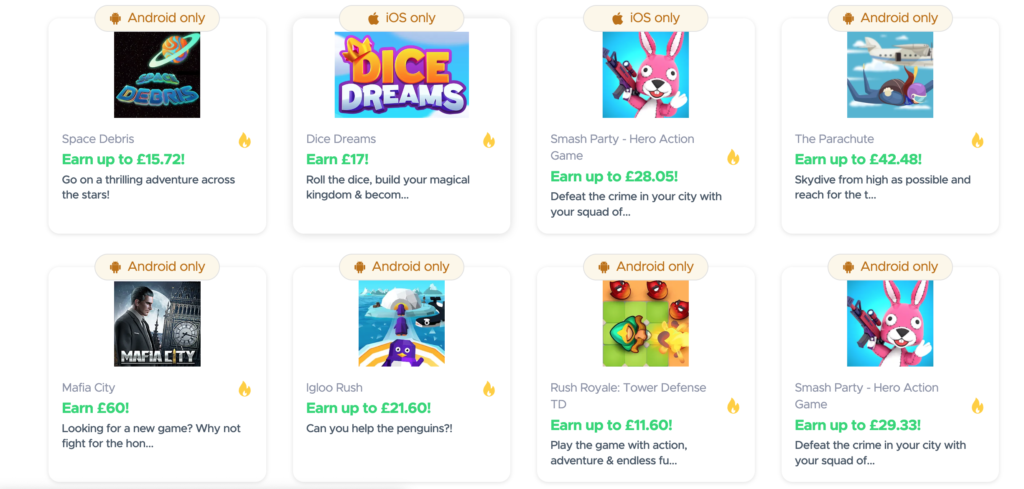
Freecash is heavily geared towards offers and gaming and is more “gamified” than most. You earn coins for completing game milestones, then convert them to cash.
It also pushes extras like:
- daily streaks
- bonus ladders
- referral rewards
If you like systems, tracking, and squeezing the most from platforms, you’ll probably get on well with it.
If you just want one simple offer now and again, it can feel like a bit much.
Also worth reading
Fancy some simple cash? Then check out these best free money offers in the UK.
5) Prime Opinion (Best “extra earner” to run alongside the others)
Prime Opinion is mainly a survey platform, but I’m including it here for one reason: I’ve personally made money with it, and it can be a useful extra app to have installed.
Gaming isn’t its main strength, so I wouldn’t rely on it for big “play games for money” payouts alone. But as a supporting app (especially alongside Swagbucks/Qmee), it can add more earning opportunities without much effort.
👉 Find out more from my full Prime Opinion review
Pro tips: how to make gaming apps actually worth your time
Here’s the part most “review” posts skip — the stuff that stops you wasting evenings on a dead offer.
- You’ll know within a few hours if a game is worth it.
If early progress feels painfully slow or heavily pushes in-app purchases, higher levels will be worse. Cut your losses and move on. - Google the game before you commit.
Search “[game name] reach level X fast” or “[game name] Swagbucks tips”. You’ll often find guides and Reddit threads that tell you whether the offer is realistic. - Compare payouts across apps first.
The same game can pay very different amounts on platforms like Swagbucks, Qmee and Freecash. Two minutes of checking can double your reward. - Don’t start an offer unless you’re ready to play.
The time limit usually starts as soon as you install the game. If you’re busy this week, wait. - Don’t spend money unless the maths works.
Spending £4 to unlock a £30 reward can be sensible. Spending £10 to chase £15 isn’t. Profit first, always. - Stick to one game at a time.
Juggling multiple offers is how people burn out and miss deadlines. Finish one, then move on. - Take screenshots as you go.
Screenshot the offer terms and your level milestones. If tracking fails, proof can be the difference between getting paid and getting nothing. - Treat this as paid downtime, not a job.
These apps work best when you’re playing while watching TV or killing time. If it starts feeling like work, it’s probably not worth it.
Why comparing payouts matters (real example)
One mistake that will cost you money is assuming all apps pay the same for the same game.
They don’t.
Here’s a real example comparing the same offers across platforms.
Monopoly Go (Level 101)
- Nectar Arcade → 400 points (~£2)
- Swagbucks → 6,800 SB (~£52)
- Prime Opinion → 10,000 points (~£75)
Full completion (around Level 300)
- Nectar Arcade → ~£43
- Swagbucks → ~£184
- Prime Opinion → ~£225
👉 Same game. Same effort. Completely different payout.
In some cases, you’re earning 3x to 5x less just by choosing the wrong platform.
Nectar Arcade is a good example of this. It looks convenient if you already use Nectar, but the payouts are consistently lower than specialist platforms.
How much can you realistically earn?
This depends on the games available at the time and how much you’re willing to grind, but realistic expectations look like this:
Swagbucks: £30–£70 per completed game (sometimes more, but this is common)
Qmee: £10–£40
Freecash: £10–£50
AttaPoll / Prime Opinion: £5–£20 (usually smaller, easier tasks)
My advice: don’t try to “do everything”. Pick one solid offer, finish it, then choose the next.
Are these apps safe?
In general, the platforms above are legitimate, but you still need to use common sense:
Only download games through the official app stores
Don’t hand over unnecessary permissions
Avoid any offer that requires you to pay to unlock earnings
Use a separate “side-hustle” email address if you hate marketing emails
Also remember: some games are designed to push spending. That doesn’t make the platform a scam — it just means you need to protect your profit.
Final verdict: are gaming apps worth it?
If you enjoy mobile games and don’t mind repetitive “upgrade and grind” gameplay, yes, they’re a decent way to earn extra money.
If you hate time limits, slow progress, or being nudged to spend, you’ll probably find these apps annoying.
Personally, I treat them as paid downtime. If a game starts feeling like work, I bin it and move on — there’s always another offer.
FAQs
Do gaming apps really pay cash in the UK?
Yes. The apps above pay via PayPal, gift cards, or points that convert into cash-equivalents.
Are “play games for money” apps gambling?
Not usually. You’re being paid for completing tracked milestones, not betting on outcomes.
The only grey area is anything that involves paying entry fees for the chance to win prizes — I avoid those.
Can I do the same game on multiple apps?
Usually no. Most offers require you to be a new player, so once you’ve installed a game, you won’t qualify elsewhere.
How long do payouts take?
It varies. Some credit quickly, others take a day or two after you hit the target. This is why screenshots are handy if tracking doesn’t behave.
Is it worth spending money to finish faster?
Sometimes — but only if it increases your profit. Always do the maths before you buy anything.